Adventures with Anycast

Earlier I discovered how to get a block of IP addresses, announce them to the internet, and have the traffic piped to a router at home. Whilst this meant that devices connected to this router had real public IP(v6) addresses accessible to any other host on the internet (with IPv6) there were a couple of things that I felt were sub-optimal about this setup. Apart from it being IPv6 only, the main issue was that all traffic was being routed through a single fixed point of presence far away from the actual router (and most likely person or thing trying to connect to it). It turns out that there’s nothing stopping you from announcing the same block of IP addresses from more than one place - a technique known as Anycast, so let’s bring the network closer! Much like how it is interesting to see the path that RF signals take from transmitter to receiver, announcing the same IP address ranges from multiple locations means we can see some of the routing decisions happening on the wider internet play out in action.
PA, PI, and a Slice of History
In short PA address space is address space that belongs to LIR (provider) and announced routes will aggregated to their network. PI space belongs to the end user (an organisation) directly and routes can be announced from anywhere. IPv4 assignments aren’t being made anymore, but through ARDC it is possible to receive some from the block reserved for Amateur Radio use.
When setting up the Autonomous System (AS) with a Local Internet Registry (LIR) - I got allocated a /44 (i.e, the highest 44 of the 128 bits of an IPv6 address are fixed - after you can choose your own addressing scheme) of IPv6 space. This is what is known as Provider Aggregatable (PA) space. It forms part of an even larger block (smaller number of fixed bits) that the LIR has been given by the Regional Registry.
The smallest block of addresses that can be announced to the internet is a /48 for IPv6 and a /24 for IPv4. A /44 allocation can therefore be assigned to \(2^4 = 16\) individual /48 networks.
Provider Aggregateable address spaces are cheap and easy to receive from a LIR. They are preferred because as the name suggests, the provider (LIR) can chose to aggregate any or all of the smaller announced networks, across all of their customers, into a single BGP anouncement to the internet. As a rule they are tied to a specific operator and can only be announced to/by them. They are also marked as PA in the (RIPE) Database - so whilst it could be technically possible to announce them to another upstream provider given the necessary authorisation, it’s also possible that other networks could still prefer to route traffic to the aggregate location instead. Naturally, if you were to stop purchasing transit or LIR services from the supplier, you would also lose the ability to use the addresses. As I wanted quite a lot of freedom to experiment with announcing from different providers, networks, and geographic locations, I wanted to use address space that was not tied to one particular supplier.
Provider Independent addresses are, as their name suggests, independent of any provider. Once allocated to you directly by a Regional Internet Registry (in this case straight from RIPE) you get to announce them anywhere you feel like. In exchange for this technical freedom, there are some rules (such as not allowing them to be used by anyone or anything outside of your organisation), tougher eligibility requirements, and higher costs. You need to actually submit an application along with justification and evidence to the registry to receive them. It’s also still necessary to be sponsored by a RIPE member (LIR) too.
After a bit of work from the folks at freetransit.ch / OpenFactory - I was able to receive not just one, but four /48’s of PI IPv6 space from RIPE to use for this project.
IPv4 - 44 Net
IPv4 space has effectively run out and no RIR will allocate any more to an LIR without a long waiting list, and certainly won’t be allocating any PI space. After a short wait however, I’d also gotten my hands on a /24 of IPv4 space from ARDC. To recap, back in 1981, the entire 44.0.0.0/8 block of IPv4 space was reserved for general Amateur Radio use. Some of this was sold to AWS in recent years, but it is still possible for ham radio licence holders to apply for chunks of this space to use in projects for non-commercial use, within the spirit of amateur radio. I’m not really sure how to describe this space in terms of PA vs PI, partly because it’s held in the ARIN registry - which it also happens to predate. Unlike even the PA space I have, it’s also not allocated to me in that database. What I got was the authorization to announce it somewhere, both in terms of an actual letter and also an entry in the Routing Assets Database RADB tying it to my ASN. Practically for this purpose I’ll consider it to be the equivalent of PI space.
Anycast
With a public ASN, and some blocks of IPv4 and IPv6 addresses that are not tied to a particular provider - it’s possible to establish a BGP session with some other providers in different locations, and announce them from there, simultaneously. The thinking here is that a remote (Teltonkia) router with a subnet of these addresses would connect to each VM over a Wireguard tunnel and have traffic routed to and from each VM through that. Whilst conceptually a Wireguard tunnel is a point-to-point link here, the packets will still travel (and be routed) over the public internet. That’s OK though, the idea is to ensure that packets addressed to a device on the router ’enter’ the tunnel at the location closest to their origin, and then travel directly to the appropriate router.
Given that most of the traffic I wanted to handle was going to originate from and/or terminate in the Nordic region, I set up a VPS with XTom (v.ps) in Tallinn and Paradox Networks (getvps) in Stockholm. Both of these suppliers set up a BGP session for the VM, and carry traffic to and from the announced IP blocks. Effectively, this now means that any packet addressed to these IP addresses could end up being handled by one of three different VMs in three different locations.
If you are thinking of doing something like this, invest the time in setting up something like Ansible to manage the configurations, packages, etc, early on!
After the BGP sessions were setup, to begin with, I assigned a single IP address from the IPv4 block and one from the IPv6 block to the loopback interface on each VM, leaving the default interface (the one actually connected to the network) alone with the hosting company’s supplied IP addresses. This now meant that I could ping that IP address, and any one of these machines would answer, depending on how the packet was routed.

At this point, it might start to feel a bit like a solution that’s common in load balancing: Round Robin DNS. This is where a single DNS query returns multiple IP addresses for the client to choose from, the intention being that the clients would make their requests to a different IP addresses for this same service. Anycast isn’t really the same though. What we are offering here is multiple routes to the same IP address, and it is up to the client’s network/ISP to select which route they will take. The client has no idea that, in this particular case, these roots lead to actually different hosts.
Downstream Routers
The goal of this setup is to avoid packets ‘backtracking’, geographically at least, from a client from outside of the network, to one of the Points of Presence (PoP) where the IP addresses are announced to the internet, and from that PoP to the actual endpoint. The endpoints are connected to a Teltonika Router and will have an IP address from the ARDC /24.
As these routers can run BGP, it makes sense to give say, a /27 to each one to announce to the points of presence, and assign via DHCP to connected clients. Importantly, the router must have a session and connection with all PoPs announcing the wider /24 address space - otherwise we will not receive packets that have been routed via a PoP we are not connected to. As we will use the same ASN throughout, the BGP sessions from the Teltonika routers to the PoPs will be referred to as an Internal BGP (iBGP) session. Given that we have to advertise the entire /24 at all PoPs (this is already the minimum that we can push out to the internet) externally anyway, and any additional Teltonika routers added will not have an interconnect with the others, practically this makes no difference to eBGP. What it will allow however is for Bird running on these PoPs to automatically add and manage the forwarding information for these smaller blocks.
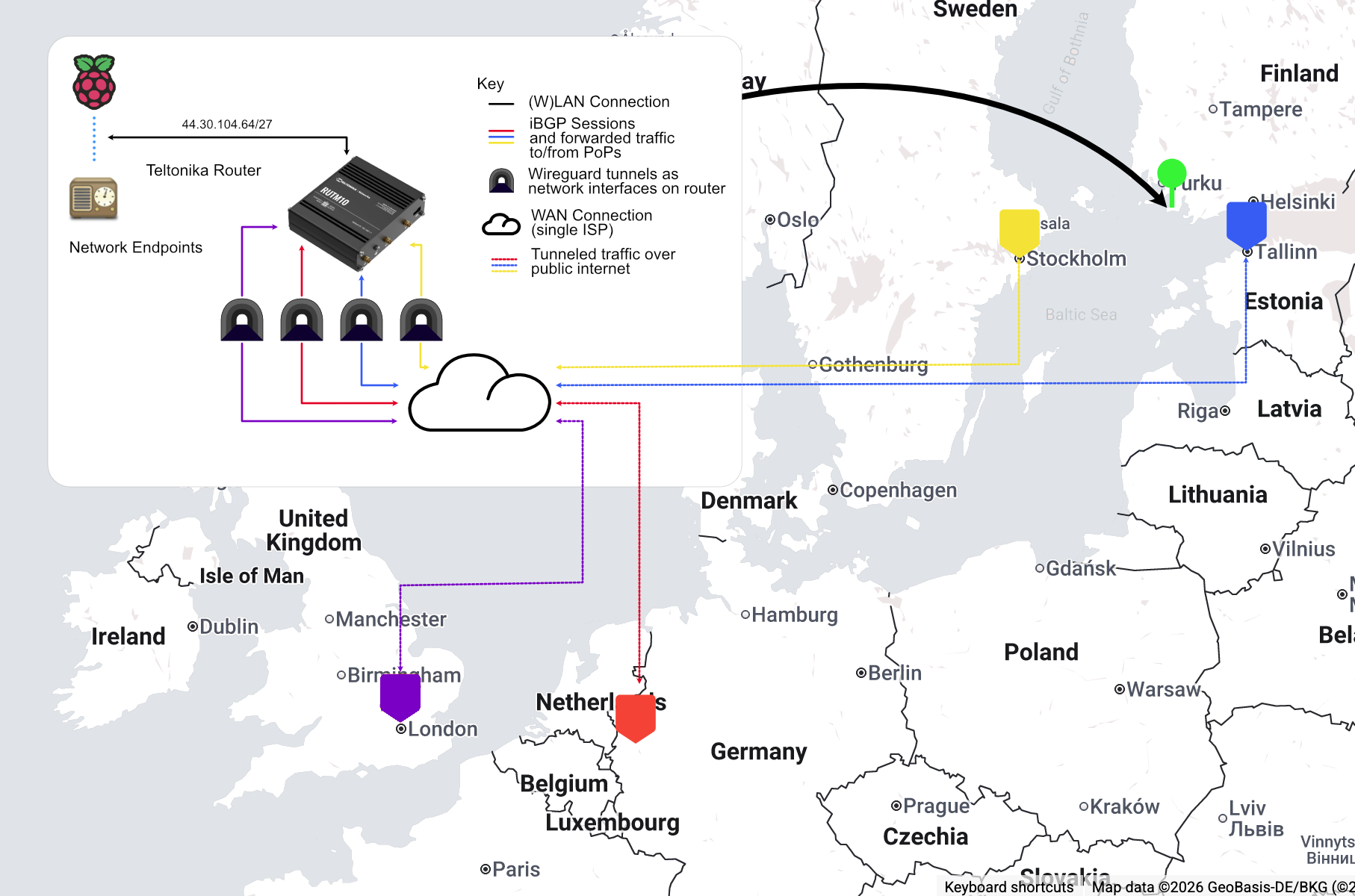
The above diagram shows this concept on a map of the actual locations of the PoPs. Given that I was in the UK at the time, I also added a London PoP using Paradox’s service. The actual physical location of the router and network of endpoints is in western Finland.
It’s important to be clear here that the router creates its wireguard tunnel by connecting to the VPSs using the IP addresses assigned to them by the hosting provider, not any of the ones in the anycast block.
So long as the external client on the internet connects to the nearest PoP advertising the entire /24, then traffic should hopefully flow in the most efficient way possible to final destination. Looking at the diagram above for example, we would wish for traffic from Helsinki to be routed to Tallinn and then onward.
Same IP - Who dis?
As an aside, I also decided to try running a service on the VPS PoPs themselves to ease debugging and performance analysis without relying on the connections to the routers.
One of the most common services to make use of an anycast deployment is DNS. Requests to the service are stateless, do not modify the resource on the server, and should be fast and small enough that gains from network latency reduction will have a tangible benefit.
As a simple test to ensure that the prefixes were getting out there, using Ansible, I set up CoreDNS server running on each instance - listening on 44.30.104.1 and 2001:67c:16c8::53. Using templates, I added a TXT record for the domain whodis.alastair.ax to report a short name for the actual location that was answering the query. Thus, running dig TXT whodis.alastair.ax @44.30.104.1 would report the name of the server that the packets are being routed to from a client network - give it, the whodis service :), a go if you’d like. The result is surrounded by a pair of tildes: ~~ to try and make it easier for using this in an automated service.
Security
One thing I noticed shortly after beginning to announce the /24 belonging to ARDC was the relentless amount of probing that was coming in from all around the world to the block. I am familiar with running VPSs and have seen plenty of traffic trying to break in, so have been a fan of Fail2Ban and reasonably tight firewalling for a while. However getting ~200x this in attempts to access the network was becoming annoying, and as these requests were mostly being forwarded down the Wireguard tunnels, were starting to be noticeable in bandwidth usage on the remote side of things.
I like to follow the Zero Trust approach to network security, i.e. the end clients, Raspberry Pis and suchlike, should not assume any level of security, or trust, just from being on this network, despite me controlling it. However we should aim to keep things as clean as possible and the network boundary is a reasonable place to do this.
Unfortunately - this is where I faced my biggest ‘gotcha’ and it took me a couple of weeks to figure it out, and I ended up implementing much more complex than necessary policy-based routing on the remote (tunneled) routers to work around it. This was caused by asymmetric routing, which I’ll describe in detail in the next section, but briefly, traffic into the router could come from one PoP, but responses could be sent out via another.
Initially I simply used UFW to manage the firewall on the BGP enabled VPS instances to do two things:
- Block incoming packets addressed to the instance itself for any port other than those whitelisted
- Block all packets addressed to anything in the announced prefixes (to be forwarded by the instance) with a source IP address belonging to a blocklist of known probes / scrapers.
A good source of addresses to block is available from https://github.com/stamparm/ipsum, and there is also a project that can script adding these to UFW, aptly called UFW Blocklist
Firewalls are in general stateful, they will keep track of connections to and from the machine. They must do this because the response to an outgoing connection to a service will arrive back on an ephemeral port number - and if this is not matched to its outgoing connection, it will be blocked. At the time, I did not realise it, but the way in which I had been configuring UFW, basically the ‘default’ way, meant that packets that should have been forwarded by the VPS, in response to a connection established through another VPS (asymmetric routing - see below), but did not have a corresponding incoming connection, were being dropped.
Initially I worked around this by using con-marking on the Teltonika routers to ensure that responses to connections incoming from one Wireguard interface, were always routed back out via that same interface. Con-marking, or connection marking, is the use of the stateful firewall to mark packets belonging to a connection with an arbitrary tag, and therefore keep track of the origin of particular connections. This was somewhat janky and whilst ‘sort-of’ worked, wasn’t really reliable or scaleable. Initially I had laid the cause of this issue to a limitation of my upstreams. At some point, I accidentally discovered that this was not the case when rebuilding one of the instances. At this point, I decided that it was time to learn what was really going on under the hood, and I was finding UFW to be an unhelpful abstraction, and IPtables hard to understand. I removed UFW completely and now rely on NFTables to handle firewalling. NFTables is billed as the modern (12+ years in the making) replacement of IPTables, and whilst a bit more low-level and verbose to work with than UFW, the tradeoff is that, in my opinion at least, we get a clearer view of what’s actually going on.
For reference, the forward section of my NFTables config looks like:
table inet filter {
    set blacklist {
        type ipv4_addr
        flags interval
    }

    chain forward {
        type filter hook forward priority 0; policy accept;
        ip saddr @blacklist counter drop
        ip daddr @blacklist counter drop
    }
}
A shell script, created with the help of an LLM, for populating the blacklist set is available here - I have this running as a daily cron task.
This is of course by no means the last word in security here - there’s no reason to consider this network particularly ‘safe’ now. Devices on the network should still run their own firewalls, application level auth(n/z), etc - but cutting down the background noise (‘QRM’ for fellow hams) here is for sure going to help a lot.
Asymmetric Routing
This is where things start to get interesting:
Above, in the top left pane, we can see a standard ping session running. This is from the Dusseldorf instance, and pinging another server - in this case a VPS running in Cambridge, UK, that is not part of our anycast network.
None of the pings appear to be being responded to (100% packet loss).
The bottom pane shows an SSH session to this target server in Cambridge. If we inspect the incoming network packets with tcpdump, we do see that the ping (echo requests) packets are coming in, from that IP address, and are indeed being replied to - to the correct IP address of the sender. Where are they going?
In the top right pane, an SSH session to the server in Stockholm, with tcpdump also running, and filtering for packets to/from the Cambridge server, shows ICMP packets arriving from Cambridge, with the corresponding sequence number and IDs to those being sent out.
So our packets can be seen to be taking the following trip geographically - even though, to the server in Cambridge, it is replying to the very same IP address it is receiving echo requests from.
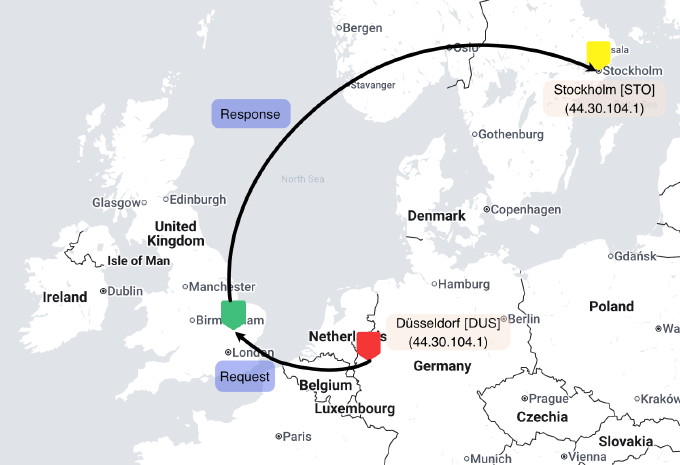
Despite being geographically further away, we see that traffic ‘prefers’ to flow from the VPS in Cambridge to the VPS instance in Stockholm.
A snippet from MTR (traceroute alternative) shows some clues as to why:
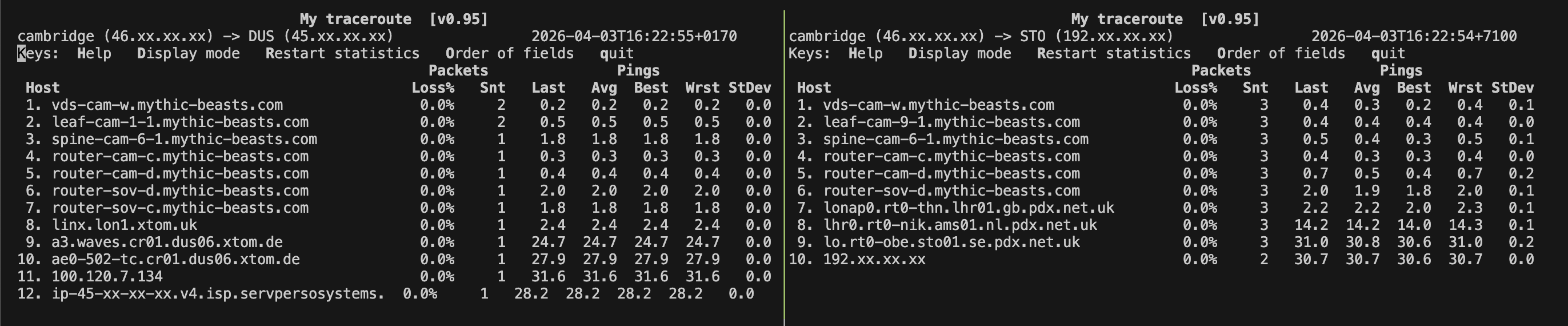
Above we see the route from the VPS Cambridge to VPSs in Düsseldorf (left), and Stockholm (right). Both of the later two VPSs are announcing the 44.30.104.0/24 block. We see that there are a couple fewer hops between Cambridge and Düsseldorf, but more interesting is looking at what we can interpret from the rDNS names of the routers along the way. The first 6 - 7 hops are within the hosting supplier’s network. After that, we see that in order to reach Düsseldorf, the packet must join the xtom network at the London Internet Exchange (LINX), before it can cross to the target network (Servperso) in Germany. The packet to Stockholm however appears to be able to transit straight from Mythic Beast’s network to Paradox’s network at the London Access Point IX. It would then go on to Stockholm using Paradox’s internal network.
Of course, the exact reasons for the routing decision at each provider are up to the provider themselves, but it would make sense that the packet would be handed off immediately to its destination network, settlement free at an exchange point, rather than engaging a third party network to carry the packet. Therefore, given the choice of multiple routes to what is logically the same destination - this would form the preferred choice.
Tracking Packets Across Europe
The previous simple ping test from Düsseldorf to Cambridge showed that traffic patterns might not be as simple as we would wish. I was hoping that traffic would simply route to the nearest, and thus lowest transit time, location. With this expanded network of PoPs - let’s fire up Globalping and see if we can map the routes of packets around Europe from a bunch of different starting points to see where they really end up. Shown below are about 30 traces from various starting points around Europe. The intermediate points, I manually inferred with liberal use of whois or just assuming the locations from the rDNS names of the intermediate routers on the MTR trace. The line colour, green to red, indicates total end-to-end ping time, with green being the shortest.
NB: I was having some issues with routing announced prefixes to the Stockholm instance, so it is not included in this experiment. Also, I didn’t count routers in the same facility with a ping time of <2ms between them as separate hops.
Beautiful chaos!
A couple of things I noticed:
- London eats up by far the lion’s share of the traffic
- The long lines between Moscow and London don’t report any intermediate routers, I suspect they are tunneled. There might also be other routes where this is the case.
- Some transit providers such as Cogent give very detailed reports of the path of the traffic
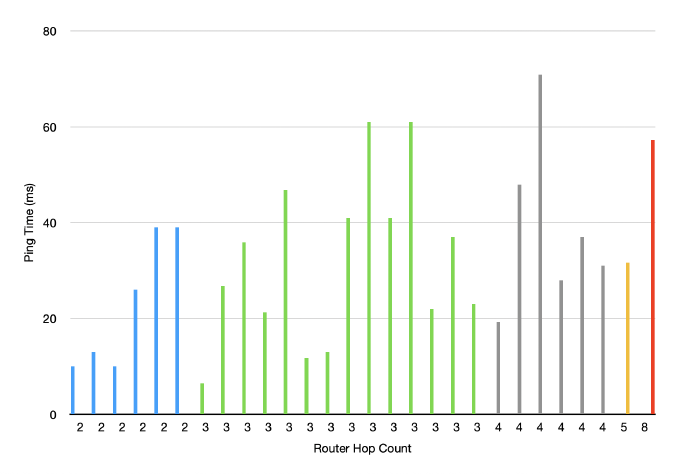
- More routing hops don’t always seem to imply longer ping times - shown in the chart below, but this is probably due to the diversity in networks and also the above potentially ‘missing’ hops
Next Steps
So whilst the network here has been built up to serve traffic in several geographic locations, it’s obvious that the traffic isn’t being evenly distributed - and some of the routes are quite strange (Helsinki to London via Moscow, as opposed to just hopping across and terminating in Tallinn!). Clearly just spraying out the prefix with several providers isn’t efficient. The next step then is going to be taking a closer look at actually where we want to collect traffic from, and which networks exactly we want to exchange traffic with.
To do this, I’m going to experiment with establishing a presence in various Internet Exchanges and being selective in where and how the prefixes are announced. For IPv6, I can make use of various PI assignments I have, and for IPv4, ARDC were kind enough to assign me another /24 block to use for these experiments. This is helpful as I should then be able to compare how announcements across various PoPs impact the routing.
See you next time! Please don’t hesitate to reach out if you have any questions or suggestions.